


VPN technologies have become an important part of modern digital security. People now use the internet for banking, remote work, shopping, communication, entertainment, and storing confidential information. As more personal and business activity moves online, protecting internet connections from unwanted monitoring and cyber threats becomes increasingly important.
A Virtual Private Network, commonly called a VPN, creates a protected connection between a device and a remote VPN server. Instead of sending internet traffic directly through a local network or internet service provider, the VPN places that traffic inside an encrypted tunnel.
This process can protect information while it travels across public or untrusted networks. It can also replace the user’s visible IP address with the IP address of the VPN server.
However, not every VPN operates in the same way. Different VPN technologies use different tunneling protocols, encryption systems, authentication methods, server networks, and privacy features.
Understanding these differences can help individuals and organizations choose a VPN solution that matches their security, privacy, compatibility, and performance requirements.
What Are VPN Technologies?
VPN technologies are the protocols, encryption systems, authentication methods, network configurations, and software tools used to create a private connection over a public network.
VPN protocols, VPN encryption, types of VPN, secure VPN.
A VPN does not create a completely separate physical internet connection. It builds a virtual network over existing infrastructure. Information travels through an encrypted tunnel between the user’s device and a VPN endpoint.
NIST describes IPsec as a widely used network-layer security control for protecting communications across IP networks. It can provide confidentiality, authentication, integrity, replay protection, and access control when configured correctly.
The main elements of VPN technology generally include:
- Data encryption
- Secure tunneling
- User or device authentication
- Cryptographic key exchange
- Traffic routing
- VPN server infrastructure
- Connection monitoring
- DNS and IP leak protection
Together, these technologies help prevent unauthorized parties from easily reading data transmitted through the VPN connection.
How Does VPN Technology Work?
When a user activates a VPN application, the device begins establishing a connection with the selected VPN server.
The process normally follows several stages.
1. The VPN Authenticates the Connection
The VPN service must confirm that the connecting device or user is authorized. Authentication may involve a password, digital certificate, cryptographic key, security token, or multi-factor authentication method.
Business VPN systems may also connect with an identity management platform to apply access policies based on the user, device, location, or security status.
2. A Secure Tunnel Is Created
The VPN client and server use a tunneling protocol to establish a protected communication channel.
This tunnel provides the path through which internet traffic travels. The protocol determines how data is packaged, transmitted, verified, and reconstructed at the destination.
3. The Data Is Encrypted
Before information leaves the device, the VPN encrypts it. Encryption converts readable information into ciphertext that cannot easily be understood without the correct cryptographic key.
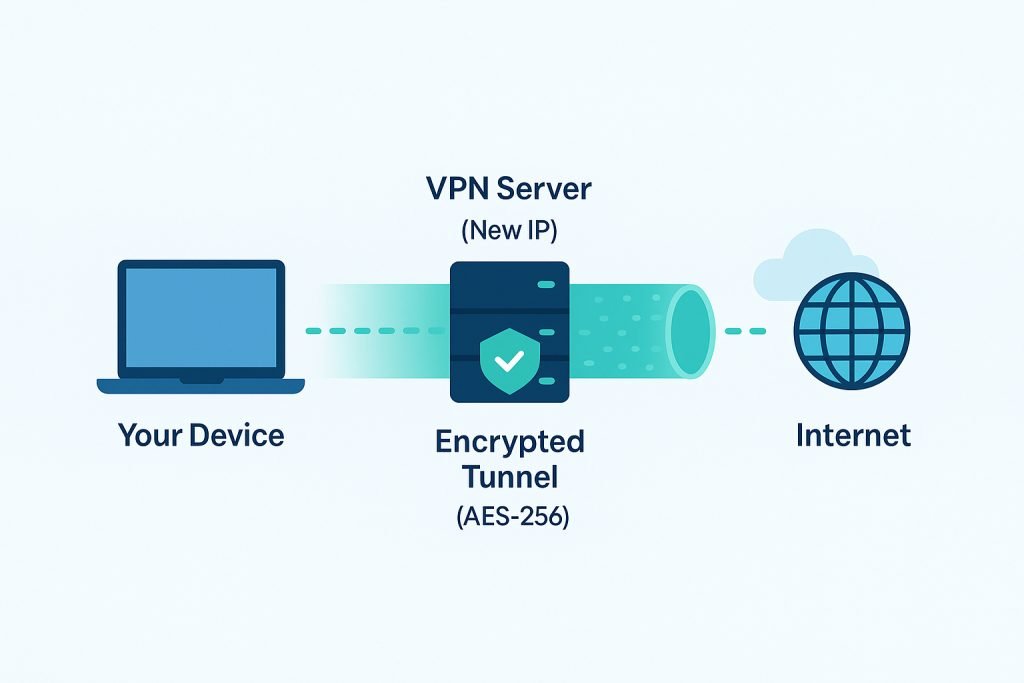
Even when someone captures the transmitted packets, effective encryption should prevent that person from reading their original contents.
4. Traffic Travels Through the VPN Server
After encryption, the traffic travels to the VPN server. The server processes the request and forwards it to the intended website, cloud platform, application, or business network.
The destination normally sees the VPN server’s public IP address rather than the user’s original public IP address.
5. The Response Returns Through the Tunnel
Data from the destination travels back to the VPN server, enters the encrypted tunnel, and returns to the user’s device. The VPN application then decrypts the data so that the operating system or application can use it.
These operations often happen in a fraction of a second, although encryption, distance, server congestion, and routing can affect connection speed.
Important Types of VPN Technologies
VPN systems can be divided into several categories according to the users, networks, and resources they connect.
Remote-Access VPN
A remote-access VPN connects an individual device to a private network or VPN provider.
Consumers commonly use remote-access VPN applications on laptops and mobile devices. Organizations also use them to give employees protected access to internal systems while working from home or travelling.
The VPN software normally requires the user to sign in before creating the encrypted tunnel.
Site-to-Site VPN
A site-to-site VPN securely connects two or more networks.
For example, a business may use it to connect a branch office network with its main headquarters. Devices on both networks can then communicate through a protected tunnel without requiring every employee to open a separate VPN application.
IPsec is frequently used for site-to-site connections because it operates at the network layer and can protect traffic between gateways. NIST identifies IKE as the protocol most commonly used to establish and manage IPsec-based VPN connections.
Client-to-Site VPN
A client-to-site VPN is commonly used by employees who need access to a company network from an external location.
It is similar to a remote-access VPN but is specifically configured to connect individual users with business resources such as internal applications, databases, file servers, and management systems.
SSL or TLS VPN
An SSL VPN uses Transport Layer Security to provide protected remote access.
Some TLS VPNs operate through a standard browser and give users access to selected web applications. Other implementations use a dedicated client to support broader network access.
NIST’s guidance on SSL VPNs discusses their use for secure remote access and compares them with technologies such as IPsec VPNs.
Cloud VPN
A cloud VPN connects users, offices, or private infrastructure with resources hosted in a cloud environment.
Businesses may use cloud VPN technology to protect traffic between:
- Employees and cloud applications
- Office networks and virtual private clouds
- Multiple cloud environments
- Data centres and cloud platforms
- Development teams and hosted servers
Cloud VPNs are especially useful for organizations that no longer store every application inside a traditional office network.
Mobile VPN
Mobile VPN technology is designed to maintain secure access while a device changes networks.
For example, a smartphone may move between mobile data, office Wi-Fi, and a public hotspot. A mobile-friendly VPN should reconnect quickly and prevent unnecessary interruptions as the network changes.
Major VPN Protocols Explained
A VPN protocol defines how the client and server establish, secure, and manage the tunnel. Protocol selection can affect speed, reliability, compatibility, and security.
| VPN protocol | Main advantage | Common use |
|---|---|---|
| WireGuard | Lightweight design and strong performance | Consumer and modern remote-access VPNs |
| OpenVPN | Flexibility and broad platform support | Personal and business VPN connections |
| IKEv2/IPsec | Stability and efficient reconnection | Mobile devices and enterprise networks |
| L2TP/IPsec | Support on older operating systems | Legacy configurations |
| SSTP | Integration with Microsoft environments | Windows-based networks |
| PPTP | Easy legacy setup | Generally unsuitable for modern security |
WireGuard
WireGuard is a modern VPN protocol designed around a comparatively small and focused architecture.
Rather than supporting a large collection of interchangeable cryptographic options, it uses a defined set of modern cryptographic components. VPN peers are identified through public keys, in a process that is often compared with exchanging SSH keys.
The protocol uses a short handshake to establish symmetric session keys before transferring encrypted data. Its streamlined design can make it easier to audit, configure, and implement than more complex alternatives.
WireGuard is often selected for:
- Fast consumer VPN connections
- Mobile devices
- Low-power hardware
- Linux-based networking
- Lightweight remote access
- Site-to-site tunnels
However, implementation quality still matters. A modern protocol cannot compensate for weak account security, poor server management, unsafe applications, or incorrect network configuration.
OpenVPN
OpenVPN is a flexible VPN protocol that has been widely adopted across consumer, business, and open-source environments.
It can operate over TCP or UDP and is supported on many operating systems. OpenVPN can use certificate-based authentication and TLS-based security for establishing protected connections.
The OpenVPN protocol separates communication into control and data channels. The control channel manages functions such as authentication and key exchange, while the data channel carries the protected tunnel traffic. OpenVPN provides options such as TLS Auth, TLS Crypt, and TLS Crypt v2 for protecting the control channel.
OpenVPN is popular because it offers:
- Broad operating-system support
- Flexible configuration
- Strong authentication options
- Compatibility with different network environments
- Extensive community and commercial support
Its configuration is more complex than WireGuard, and performance depends heavily on the software version, selected algorithms, server resources, and network conditions.
IKEv2/IPsec
IKEv2 is commonly paired with IPsec.
IPsec protects IP packets, while Internet Key Exchange version 2 negotiates security settings, authenticates endpoints, and manages cryptographic keys. Together, IKEv2 and IPsec form a widely used VPN solution for mobile users, enterprises, and site-to-site connections.
IKEv2/IPsec is known for maintaining stable connections when a device moves between networks. This makes it suitable for smartphones and laptops that frequently switch between Wi-Fi and mobile data.
Common benefits include:
- Fast reconnection
- Strong enterprise support
- Native support on major operating systems
- Reliable mobile performance
- Suitability for site-to-site networking
Security depends on the cryptographic suite, authentication method, certificate management, and implementation settings selected by the administrator.
L2TP/IPsec
Layer 2 Tunneling Protocol does not provide strong encryption by itself. It is therefore commonly combined with IPsec.
L2TP/IPsec remains available on some operating systems and legacy devices. However, organizations building a new VPN environment will usually find that more modern options provide better security, performance, and manageability.
Microsoft currently advises against using L2TP or PPTP in new Windows Server VPN configurations because of their limited security features.
Read More: Technology in Emergency Services: Key Benefits
SSTP
Secure Socket Tunneling Protocol is closely associated with Microsoft environments.
It carries VPN traffic through TLS and commonly uses TCP port 443. This can help it operate on networks where other VPN connections are blocked by restrictive firewall rules.
SSTP can be useful for Windows-focused organizations, but it does not provide the same level of cross-platform flexibility and open implementation options as WireGuard or OpenVPN.
PPTP
Point-to-Point Tunneling Protocol is one of the oldest commonly recognized VPN protocols.
It became popular because it was simple to configure and was included in many operating systems. However, its security model is no longer appropriate for protecting sensitive modern communications.
PPTP configurations that depend on older authentication systems have known weaknesses, and Microsoft does not recommend PPTP for modern Windows Server VPN deployments.
Users should select a modern protocol unless they are maintaining a controlled legacy system with no practical replacement.
Important Features of Modern VPN Technologies
A VPN protocol is only one part of a complete VPN service. Modern applications include additional features that improve privacy, availability, and usability.
Kill Switch
A kill switch blocks internet traffic when the VPN connection unexpectedly drops.
Without this feature, a device may return to its regular internet connection and expose its original IP address. A reliable kill switch keeps traffic blocked until the protected connection is restored or the user manually disables the feature.
Split Tunneling
Split tunneling allows selected applications or destinations to use the VPN while other traffic uses the normal internet connection.
For example, an employee may send business applications through the company VPN while using a direct connection for video streaming or local printing.
Split tunneling can improve performance, but it must be configured carefully because traffic outside the VPN does not receive the tunnel’s protection.
DNS Leak Protection
DNS translates domain names into the IP addresses computers use to locate online services.
A DNS leak occurs when these requests travel outside the VPN tunnel. DNS leak protection sends supported DNS requests through approved resolvers and helps prevent the local network or internet provider from observing those requests directly.
Multi-Hop Routing
A multi-hop connection routes traffic through more than one VPN server.
This can make traffic analysis more difficult, but it can also increase latency and reduce connection speed. It is most useful for users with specific privacy requirements rather than for every routine browsing session.
VPN Obfuscation
Obfuscation attempts to make VPN traffic resemble ordinary internet traffic.
This feature may help users connect through restrictive networks that identify or block recognizable VPN protocols. Its effectiveness depends on the technique, local network controls, and implementation.
Always-On VPN
An always-on VPN automatically creates a protected connection whenever an authorized device accesses the internet.
Organizations use this feature to reduce the risk of employees forgetting to activate the VPN. It may also support centralized policies, traffic inspection, access control, and compliance monitoring.
Multi-Factor Authentication
Multi-factor authentication requires an additional verification method beyond a password.
A business VPN may ask for a one-time security code, authenticator approval, hardware key, biometric check, or certificate. This reduces the chance that a stolen password alone will provide access to private systems.
Seven Ways VPN Technologies Improve Digital Security
1. Protecting Data on Public Wi-Fi
Public Wi-Fi networks in hotels, airports, cafés, and shopping centres may not provide a trustworthy environment.
A correctly configured VPN encrypts traffic between the device and VPN server, making transmitted information more difficult for others on the local network to inspect.
2. Securing Remote Work
Remote employees often need to access confidential files, internal applications, customer information, and cloud management tools.
A business VPN can create a protected path to these resources while applying authentication and access policies.
3. Reducing Direct IP Exposure
Websites normally see the public IP address of the VPN server rather than the user’s original address.
This does not make a person completely anonymous, but it reduces direct exposure of the home or mobile connection’s public IP address.
4. Protecting Site-to-Site Communications
Organizations can use VPN technology to connect offices, data centres, warehouses, retail locations, and cloud networks.
A site-to-site VPN protects data travelling between these locations without requiring individual users to create separate tunnels.
5. Supporting Secure Mobile Access
Protocols such as IKEv2/IPsec and WireGuard can provide reliable connectivity for mobile devices.
A well-designed VPN application can quickly restore the tunnel after a device switches networks or temporarily loses connectivity.
6. Providing Controlled Business Access
Organizations can combine VPN systems with identity management, multi-factor authentication, certificates, and role-based permissions.
This allows administrators to control which users and devices can enter protected parts of the network.
7. Reducing Monitoring on Local Networks
A VPN encrypts traffic before it passes through the local network.
The network operator may still see that the device is communicating with a VPN server, but it should not be able to read the protected contents of the tunnel when modern encryption is implemented correctly.
What a VPN Cannot Do
VPN marketing sometimes creates unrealistic expectations. A VPN is a useful security and privacy tool, but it is not a complete cybersecurity solution.
A VPN cannot automatically:
- Remove malware from a device
- Stop every phishing attack
- Protect information entered on a fraudulent website
- Prevent account compromise caused by weak passwords
- Make a user completely anonymous
- Guarantee that a website will not track activity
- Protect data after it leaves the VPN server
- Replace antivirus software or system updates
A VPN provider can also become a point of trust because internet traffic passes through its infrastructure. Users should therefore evaluate the provider’s ownership, security practices, privacy policy, technical design, and transparency.
How to Choose the Right VPN Technology
The best VPN depends on what the connection needs to accomplish.
Check the Available Protocols
Look for modern options such as WireGuard, OpenVPN, or IKEv2/IPsec.
Avoid relying on PPTP for sensitive communications. Legacy protocols should only be used when compatibility is essential and the associated risks are understood.
Review the Privacy Policy
Read what information the provider collects, why it collects it, and how long it keeps it.
A “no-logs” statement should be supported by a clear policy explaining the treatment of connection timestamps, IP addresses, device information, bandwidth records, DNS requests, and account data.
Look for Independent Security Reviews
Independent audits do not guarantee perfect security, but they can provide useful evidence about applications, server configurations, privacy controls, and internal processes.
Check the date and scope of an audit instead of relying only on promotional claims.
Consider Performance
VPN performance is influenced by:
- Distance from the VPN server
- Server congestion
- Protocol selection
- Encryption processing
- Internet connection quality
- Device performance
- Routing efficiency
A large server list does not automatically guarantee faster service. Server quality, capacity, and network management are equally important.
Confirm Device Compatibility
A suitable VPN should support the operating systems, routers, browsers, mobile devices, or business platforms that will use it.
Organizations should also check whether the VPN integrates with their identity provider, firewall, cloud infrastructure, endpoint management system, and authentication tools.
Examine Security Features
Look for features such as:
- Kill switch
- DNS leak protection
- Multi-factor authentication
- Automatic reconnection
- Secure protocol selection
- IPv6 protection
- Application-based split tunneling
- Trusted-network controls
- Certificate authentication
Not every user needs every feature, but the important protections should work reliably and remain easy to understand.
VPN Technologies for Businesses
Business VPN requirements are different from ordinary consumer requirements.
A company must manage many users, devices, offices, applications, and permission levels. It may also need to record access activity, enforce compliance policies, revoke credentials, and separate different departments or customer environments.
A professional business VPN strategy should include:
- Multi-factor authentication
- Device verification
- Centralized access management
- Strong certificate handling
- Timely software updates
- Secure protocol configurations
- Network segmentation
- Activity monitoring
- Incident-response procedures
- Regular access reviews
Traditional VPNs often give an authenticated user broad access to a private network. Modern organizations are increasingly combining VPN connectivity with identity-based access and Zero Trust principles.
This approach limits access according to the specific application or resource a person needs instead of treating every authenticated user as fully trusted.
The Future of VPN Technology
VPN technology continues to develop as networks become more distributed.
Employees now connect from homes, coworking spaces, mobile networks, hotels, branch offices, and cloud-hosted desktops. Applications may be spread across private data centres, public cloud services, and software-as-a-service platforms.
Several developments are likely to shape the future of VPN technologies.
Identity-Centred Security
Future access systems will increasingly evaluate the identity of the user, condition of the device, sensitivity of the resource, and context of the request.
A successful VPN login may no longer be enough to receive broad network access.
Integration With Zero Trust and SASE
VPNs are being integrated with Zero Trust Network Access and Secure Access Service Edge platforms.
These systems combine networking, identity, security inspection, policy enforcement, and cloud-delivered access. VPNs may remain part of the architecture while becoming one component of a broader security platform.
Improved Mobile Performance
Modern protocols will continue to focus on rapid reconnection, reduced latency, efficient battery use, and stable operation across changing networks.
These improvements are important because mobile devices increasingly serve as primary work and communication tools.
Greater Protocol Efficiency
Streamlined protocols, hardware acceleration, optimized routing, and more efficient cryptographic processing can reduce the performance cost of encryption.
The goal is to make secure connectivity feel as responsive as a direct internet connection.
Preparation for Post-Quantum Security
Current public-key systems may eventually need to be replaced or combined with cryptographic methods designed to resist future quantum-computing attacks.
This transition will require careful standardization, testing, and migration. WireGuard’s own documentation notes that its current design does not provide forward-secure post-quantum secrecy, illustrating why this remains an area of ongoing development rather than a finished feature.
Frequently Asked Questions About VPN Technologies
What is the best VPN technology?
There is no single protocol that is best for every situation. WireGuard is often suitable for speed and simplicity, OpenVPN provides flexibility and broad compatibility, and IKEv2/IPsec performs well for mobile and enterprise connections.
Are VPN technologies completely secure?
No technology is completely secure. VPN protection depends on the protocol, encryption settings, software quality, authentication method, server management, user behaviour, and device security.
Does a VPN make internet activity anonymous?
A VPN can hide the original public IP address from websites and encrypt traffic between the device and VPN server. However, websites may still identify users through account logins, cookies, browser fingerprints, payment records, and other tracking techniques.
Can a VPN increase internet speed?
A VPN normally introduces some processing and routing overhead. In limited situations, it may improve performance when the original route is inefficient or traffic is being selectively slowed, but faster speeds are not guaranteed.
Which VPN protocols should be avoided?
PPTP should generally be avoided for sensitive modern communications because of its outdated security model. L2TP/IPsec may still work on legacy systems, but modern alternatives usually provide stronger features and better performance.
Is a free VPN safe?
Some free VPNs may be legitimate, but operating secure servers and applications costs money. Users should understand how the provider funds the service, what information it collects, whether it limits security features, and whether its applications have received independent review.
Is a VPN necessary for remote workers?
A VPN is useful when employees need protected access to company networks or when they connect through untrusted networks. However, organizations may also use identity-based access, Zero Trust systems, managed devices, and application-specific gateways alongside or instead of a traditional full-network VPN.
Conclusion
VPN technologies play an important role in protecting online communication, remote work, mobile access, and connections between private networks.
Modern options such as WireGuard, OpenVPN, and IKEv2/IPsec offer different combinations of security, speed, compatibility, and manageability. Additional features such as kill switches, DNS leak protection, multi-factor authentication, and split tunneling can improve the overall experience when they are implemented correctly.
