


Connecting MetaTrader 5 to a language model lets an Expert Advisor interpret context, classify conditions, or signals without exposing provider credentials to trading code. This guide explains how to integrate an LLM with an MQL5 Expert Advisor using a Python server.
You will build a FastAPI bridge, call an LLM securely, return validated JSON, and consume the response inside an EA. The design keeps deterministic risk controls in MQL5, handles timeouts and malformed output, and supports testing before live deployment begins.
Understanding the Integration
An MQL5 Expert Advisor is an automated trading program that operates inside MetaTrader 5. It can monitor market conditions, calculate technical indicators, manage positions, and execute orders according to predefined rules.
A large language model can add another analytical layer. For example, it may classify market conditions, summarize economic context, evaluate structured signals, or explain why a potential setup appears strong or weak.
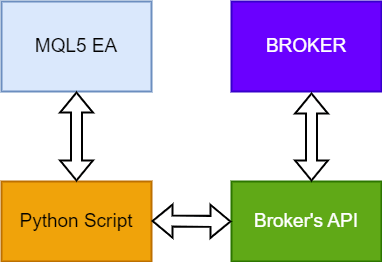
However, connecting an Expert Advisor directly to an LLM provider is not usually the safest design. A Python server can act as a secure intermediary between MetaTrader 5 and the language model.
Read More: How to Create PMax and Demand Gen Video Ads Using Google Veo
How the System Works
The integration normally follows this sequence:
- The Expert Advisor collects relevant market information.
- MQL5 sends that information to the Python server.
- The Python server validates the submitted data.
- The server prepares a structured request for the LLM.
- The model evaluates the information and returns a response.
- Python checks and standardizes the response.
- The validated result is returned to the Expert Advisor.
- The EA applies its own risk and execution rules.
The LLM should provide analysis rather than unrestricted control. Final trading decisions should remain subject to deterministic rules inside the Expert Advisor.
Why a Python Server Is Important
It protects sensitive credentials
An LLM provider normally requires an API key. Storing that key directly inside an Expert Advisor can expose it when the EA is shared, copied, decompiled, or installed on another computer.
The Python server keeps the provider credential away from the trading terminal. MetaTrader communicates with the private server rather than accessing the model provider directly.
It standardizes model responses
A language model may return longer explanations, formatting variations, or unexpected wording. The Python layer can convert the response into a controlled format containing only approved fields.
A standardized response might contain:
- Recommended action
- Confidence value
- Short explanation
- Request identifier
- Response timestamp
- Model version
The server should reject any response that does not follow the required structure.
It simplifies future changes
The model provider, prompt, validation rules, or analytical workflow can be changed on the Python server without rebuilding the entire Expert Advisor.
This separation makes the system easier to maintain and allows developers to compare multiple models while keeping the MQL5 trading logic stable.
It provides centralized monitoring
The server can record request times, response times, failures, rejected outputs, model versions, and usage levels. These records help identify reliability problems without filling MetaTrader logs with unnecessary information.
Sensitive credentials and private account information should not be recorded.
What Information Should the EA Send?
The Expert Advisor should send only information that is relevant to the requested analysis. Supplying excessive raw data can increase processing time, cost, and ambiguity.
Useful information may include:
- Trading symbol
- Timeframe
- Bid and ask prices
- Current spread
- Recent price direction
- Moving-average values
- Relative Strength Index
- Volatility measurements
- Support and resistance levels
- Current position status
- Time of the most recent candle
- Results from existing strategy filters
The request should clearly identify what the model needs to evaluate. For example, it may be asked to classify the conditions as bullish, bearish, or neutral rather than generating an unrestricted trading plan.
What Should the LLM Return?
A narrow and predictable response is more useful than a long market commentary. The server can require the model to return an approved action, confidence value, and short reason.
The action should come from a restricted list, such as:
- BUY
- SELL
- HOLD
Any missing, malformed, or unsupported action should automatically become HOLD.
The confidence value should not be treated as a guaranteed probability of success. It is generated by the model and may not be statistically calibrated. Position size and account exposure should therefore remain controlled by tested risk-management rules.
Connecting MetaTrader 5 to the Python Server
MQL5 provides the WebRequest() function for communicating with web services. Before MetaTrader can contact the Python server, its address must be added to the permitted URL list under the Expert Advisors settings.
For local development, the Python service may operate on the same computer as MetaTrader. A production system can use a remote server protected by HTTPS and access controls.
It is important to understand that WebRequest() is synchronous. The Expert Advisor waits for the server to respond before continuing that part of its operation. Slow model responses can therefore delay the EA.
The request frequency and timeout settings must be planned carefully.
Avoid Sending a Request on Every Tick
Calling the LLM on every price tick can create serious performance problems. It may generate duplicate analysis, increase API expenses, trigger rate limits, and delay the Expert Advisor.
More practical request triggers include:
- At the opening of a new candle
- After a technical setup is detected
- When a trend classification changes
- At a controlled time interval
- Before confirming a filtered trade setup
- When an open position requires scheduled review
For an hourly strategy, one request per new hourly candle may be sufficient. A faster strategy may need more frequent analysis, but latency should be tested before live use.
Keeping Trading Decisions Safe
The language model should never have unrestricted authority over trade execution. The Expert Advisor must independently enforce every important trading rule.
These controls should include:
- Permitted trading symbols
- Allowed trading sessions
- Maximum spread
- Maximum position size
- Maximum risk per trade
- Required stop-loss level
- Minimum reward-to-risk ratio
- Maximum number of open positions
- Daily loss limit
- Account drawdown limit
- Available margin verification
- Duplicate trade prevention
- Maximum signal age
- Emergency trading disable option
Even when the model returns a BUY or SELL response, the EA should reject the signal if any local risk condition fails.
Handling Errors and Unavailable Services
External services can fail because of network interruptions, provider outages, expired credentials, rate limits, invalid responses, or server maintenance.
The safest default action is HOLD.
The EA should avoid opening a position when:
- The Python server cannot be reached
- The request exceeds its timeout
- Authentication fails
- The server returns an error
- Required response fields are missing
- The model returns an unsupported action
- The response is too old
- The confidence value is outside the accepted range
- Market conditions have changed since the request was sent
This is known as failing closed. A failure blocks trading instead of accidentally authorizing it.
Preventing Stale Trading Signals
Market conditions may change while the model is processing a request. A response that was relevant several seconds or minutes earlier may no longer match the current price.
Each request should include a timestamp or candle identifier. The server should return that identifier with its response.
The Expert Advisor can then reject the analysis when:
- The related candle has closed
- The current price has moved beyond a defined limit
- The spread has increased significantly
- The response exceeds the permitted age
- A new signal has already replaced the original request
This prevents delayed analysis from triggering trades under different market conditions.
Securing the Python and MQL5 Connection
A local prototype may use a server that is accessible only from the same computer. A remote production service requires stronger protection.
Recommended security measures include:
- HTTPS encryption
- Private authentication credentials
- Request-rate limits
- Restricted network access
- Maximum request-size limits
- Regular credential rotation
- Input validation
- Output validation
- Secure server permissions
- Protected application logs
- Generic public error messages
- Monitoring for repeated failed requests
The LLM provider key should remain on the Python server. It should not be placed in the Expert Advisor, website address, public repository, or visible configuration file.
Testing the Integration
Test the Python server independently
Confirm that the server accepts valid market data and rejects incomplete or incorrect submissions. Test missing fields, unsupported symbols, impossible prices, incorrect authentication, and excessive request sizes.
Test invalid model responses
The system should also be tested with missing fields, unsupported actions, out-of-range confidence values, and incorrectly formatted responses.
Every invalid response should result in no trading action.
Test network failure
Temporarily disconnect or stop the Python server. The Expert Advisor should remain stable, record the failure, and avoid opening a position.
Use a demo account
The complete workflow should run on a demo account before any live deployment. Review each model response, the EA’s final decision, and the reason a signal was accepted or rejected.
Maintain consistent test records
Record the model version, analytical instructions, request time, response time, submitted indicators, returned classification, final EA decision, and eventual market outcome.
These records make it possible to evaluate whether the LLM provides measurable value beyond the original trading strategy.
Strategy Tester Limitations
MQL5’s WebRequest() function is not executed in the MetaTrader 5 Strategy Tester. Therefore, a normal historical backtest cannot call the live Python server through that function.
A practical alternative is to prepare model decisions in advance and store them with corresponding timestamps or candle identifiers. The Strategy Tester can then use those fixed decisions during historical simulation.
This method also improves repeatability. If a live model is called during every test, changes to the model or its responses could make identical backtests produce different results.
Measuring Whether the LLM Improves the EA
Adding artificial intelligence does not automatically improve a trading strategy. The LLM-enhanced version should be compared against the original EA under equivalent conditions.
Useful evaluation metrics include:
- Number of signals generated
- Number of signals rejected
- Win rate
- Average winning and losing trade
- Profit factor
- Maximum drawdown
- Average request latency
- Invalid-response rate
- Timeout rate
- Trading costs
- LLM usage costs
- Performance across different market conditions
The comparison should include spreads, commissions, slippage, and realistic execution conditions.
The most important question is not whether the model produces convincing explanations. It is whether the complete strategy performs more reliably after costs and risk controls.
Common Integration Problems
MetaTrader cannot reach the server
The server address may not have been added to MetaTrader’s permitted URL list. The server could also be offline, blocked by a firewall, or listening on an inaccessible network address.
The Expert Advisor becomes slow
The model may be called too frequently, or the timeout may be too long. Restricting requests to new candles or confirmed setups can reduce delays.
The server rejects market data
The submitted field names, formats, or permitted value ranges may not match the server’s validation rules.
The model returns inconsistent answers
The analytical instructions may be too broad. Restrict the possible actions, define the required fields, and keep the requested task narrow.
Old responses trigger new trades
Requests and responses may not contain matching timestamps or signal identifiers. Add an expiry rule so outdated analysis is automatically rejected.
API expenses increase unexpectedly
The EA may be sending duplicate requests or excessive market information. Reduce request frequency, prevent repeated candle analysis, and limit the submitted data.
Best Practices for Production Deployment
Before live deployment:
- Keep the model’s responsibility narrow.
- Validate every incoming and outgoing field.
- Use
HOLDas the default response. - Reject delayed or incomplete analysis.
- Protect every endpoint with authentication.
- Use encrypted communication.
- Prevent duplicate requests.
- Apply deterministic risk controls inside MQL5.
- Monitor server availability and latency.
- Test the system on a demo account.
- Maintain a manual emergency stop.
- Compare results with the original EA.
The model should enhance an existing strategy, not replace the safeguards that make automated trading manageable.
Frequently Asked Questions
Can an MQL5 Expert Advisor connect directly to an LLM?
An EA can communicate with supported web services, but a direct connection may expose provider credentials and make response validation difficult. A Python server provides a safer and more flexible integration layer.
Why is Python used between MQL5 and the model?
Python can manage authentication, request validation, model communication, error handling, logging, and response standardization. It also makes switching between model providers easier.
Can the LLM execute trades automatically?
The model can return a restricted signal, but the EA should retain control over execution. Risk limits, position size, stop-loss placement, spread checks, and order validation should remain deterministic.
How frequently should the EA request analysis?
It depends on the strategy. Calling the model once per new candle or after a technical setup passes initial filters is generally more manageable than sending a request on every tick.
What happens if the model returns an invalid response?
The server should reject the response, and the Expert Advisor should take no trading action. Invalid or incomplete analysis should always default to HOLD.
Can the integration be tested in the MT5 Strategy Tester?
A live WebRequest() connection does not operate normally in the Strategy Tester. Pre-generated model decisions can be matched with historical candles for repeatable testing.
Can a locally installed LLM be used?
Yes. The Python server can communicate with a local model instead of a hosted provider, provided the model offers a compatible interface. The same security, validation, and risk principles still apply.
Is the model’s confidence score reliable for position sizing?
A model-generated confidence score is not necessarily a calibrated probability. Position size should be calculated through tested account-risk rules rather than the model’s confidence alone.
Conclusion
Understanding how to integrate an LLM with an MQL5 Expert Advisor using a Python server begins with separating analysis from execution. Python securely manages model communication and response validation, while MQL5 retains control over risk and orders. With limited request frequency, strict validation, secure communication, stale-signal protection, and controlled testing, an LLM can become a useful analytical component without replacing essential trading safeguards.
