


How to Create PMax and Demand Gen Video Ads Using Google Veo gives advertisers a practical way to turn existing images into polished video variations inside Google Ads. Veo can reduce production barriers, expand creative coverage, and help brands prepare assets for YouTube, Shorts, Discover, Gmail, and other eligible placements.
Results depend on strong imagery, aspect ratios, accurate branding, and campaign testing. The workflow covers differences between PMax and Demand Gen, quality checks and measurement practices before scaling AI-generated creative.
What Is Google Veo for Advertising?
Google Veo is an AI video-generation model capable of creating realistic motion, scenes, camera movements, and visual effects. Within Google Ads, Veo-powered tools can transform static images into video variations that advertisers may use in eligible campaigns.
This capability is particularly valuable for businesses that have professional product images but lack the budget or production resources to create multiple video advertisements.
Google announced that Veo in Google Ads could generate video variations from static images, helping advertisers increase asset variety and improve campaign Ad Strength. Feature availability can differ by account, language, country, and rollout stage.
Veo does not replace campaign strategy or professional review. It accelerates creative production, while advertisers remain responsible for checking accuracy, branding, legal compliance, and overall quality.
Read More: Oracle Japan Stock Climbs 7% Following Record First-Quarter Performance
PMax and Demand Gen Video Ads Explained
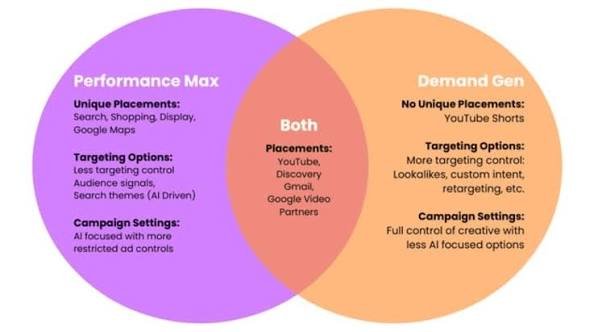
Performance Max and Demand Gen both support video, but they serve different advertising purposes.
| Feature | Performance Max | Demand Gen |
|---|---|---|
| Primary purpose | Generate conversions across Google inventory | Create and convert demand on visual surfaces |
| Main placements | Search, YouTube, Display, Discover, Gmail and Maps | YouTube, Shorts, Discover, Gmail and Google Display Network |
| Campaign structure | Asset groups | Ad groups and individual ads |
| Creative control | More automated distribution | Greater visual and placement control |
| Best suited for | Sales, leads and conversion-focused goals | Product consideration, engagement and customer acquisition |
| Video role | Supports reach across eligible inventory | Central to visual storytelling |
Performance Max is a goal-based campaign type that provides access to Google’s advertising inventory from one campaign. Demand Gen concentrates on visual-first environments where users may not yet be actively searching for a product.
What You Need Before Creating a Veo Video Ad
Prepare the following materials before opening the Google Ads creative tools:
- A high-resolution product or lifestyle image
- A clear campaign objective
- Your brand name and logo
- Approved colors and fonts
- Product benefits or primary offer
- Final landing-page URL
- Short headline and description options
- Required legal or promotional disclaimers
- Conversion tracking configured in Google Ads
- A defined target audience or audience signal
Your source image has a major influence on the generated result. Use an image with a clearly visible subject, sufficient empty space, natural lighting, and minimal visual clutter.
Avoid uploading low-resolution screenshots, images with distorted products, excessive text, or visuals for which you do not hold appropriate commercial rights.
How to Create a Video Using Google Veo
The interface may vary as Google releases new creative features, but the general process follows these stages.
Step 1: Access the Google Ads Creative Tools
Sign in to Google Ads and open the campaign or creative workflow where you want to generate video assets.
Depending on account eligibility, Veo-powered features may appear within Asset Studio, the Media Picker, an asset-group workflow, or the creative enhancement options available for a campaign.
Asset Studio is Google Ads’ account-level area for accessing and managing creative assets.
If image-to-video generation is not visible, the feature may not yet be available for your account. You can still upload an independently generated video or use Google Ads’ available video-building tools.
Step 2: Select a Strong Source Image
Choose an image representing the subject you want to animate. This could be:
- A product on a simple background
- A person using the product
- A vehicle in an appropriate setting
- A hotel, property or destination
- A mobile device displaying an app
- Food presented in a realistic environment
- A branded lifestyle photograph
The image should match the product and landing page. AI animation should enhance the original creative without changing its fundamental identity.
Step 3: Define the Intended Motion
Determine what should move within the video. Useful motion ideas include:
- A slow camera push toward the product
- A smooth pan across a room or landscape
- Natural fabric or hair movement
- Steam rising from food or a drink
- Light shifting across a product
- A person performing a simple action
- A vehicle moving through a realistic environment
- A product rotating gently for visibility
Keep the concept simple. Short advertisements normally benefit from one clear subject and one controlled movement instead of several complicated actions.
Step 4: Write a Specific Video Prompt
A useful prompt describes the subject, environment, action, camera direction, lighting, mood, and elements that must remain unchanged.
A practical structure is:
Create a short advertising video showing [subject] in [environment]. Use [camera movement] with [lighting and mood]. Keep the product shape, packaging, colors, logo, and text unchanged. Avoid distortion, additional objects, and unrealistic movement.
For example:
Create a premium product video showing this running shoe on a clean studio platform. Add a slow camera orbit with soft directional lighting and subtle shadows. Keep the shoe design, colors, logo, laces, and proportions unchanged. Do not add people, text, or other products.
The prompt should describe visible actions rather than broad claims such as “make this convert better.” Veo can generate visuals, but it cannot independently determine whether an advertisement will deliver profitable conversions.
Step 5: Generate Multiple Variations
Create several versions using controlled changes, such as:
- Different camera movements
- Alternative backgrounds
- Faster or slower pacing
- Product-focused and lifestyle-focused scenes
- Horizontal, square, and vertical compositions
- Different opening frames
Do not change every creative element simultaneously. Controlled variations make it easier to identify which concept, hook, or format contributes to stronger performance.
Step 6: Review the Entire Video
Watch each generated video frame by frame before placing it in a campaign.
Check for:
- Incorrect product dimensions
- Changed logos or packaging
- Misspelled or distorted text
- Unnatural hands or body movement
- Unexpected objects
- Impossible reflections or shadows
- Misleading product behavior
- Abrupt transitions
- Cropped branding
- Unsupported claims
- Visuals that conflict with the landing page
Regenerate or reject any video containing factual or visual errors. A polished appearance does not guarantee that every generated detail is accurate.
Step 7: Add Brand and Advertising Elements
After approving the visual sequence, add the necessary advertising components:
- Brand logo
- Product name
- Main customer benefit
- Promotional offer
- Call to action
- Captions
- Legal disclaimers
- Background music or approved audio
- End card
Keep text concise and position it within safe areas so it remains visible when the video appears on different screens.
Do not rely only on sound to communicate the offer. Many users may initially encounter an advertisement with audio muted.
How to Use Veo Videos in Performance Max
Performance Max campaigns organize creative assets within asset groups. Each asset group should contain materials that support the same product, service, theme, or audience intention.
Performance Max Workflow
- Open an existing Performance Max campaign or create a new one.
- Select the relevant asset group.
- Open the asset editing interface.
- Locate the video or media section.
- Generate or upload the approved Veo video.
- Add compatible headlines, descriptions, images, logos, and calls to action.
- Confirm that the final URL matches the advertised content.
- Review the asset group before publishing.
Google may automatically create videos when an advertiser does not provide one. These videos can be assembled from images, text, logos, or Merchant Center information included in the asset group. Google may also adapt horizontal videos into square or vertical versions for placements such as YouTube Shorts.
Providing reviewed video assets gives you greater influence over branding, visual quality, product presentation, and messaging.
Recommended PMax Video Variations
A useful starting set includes:
- One horizontal video for standard YouTube placements
- One vertical video for mobile and Shorts
- One square video for adaptable feed placements
- One product-focused creative
- One lifestyle or problem-and-solution creative
Performance Max determines where and how eligible assets are delivered based on campaign objectives and predicted performance. For this reason, every uploaded video should make sense independently.
How to Use Veo Videos in Demand Gen
Demand Gen campaigns are built for visual storytelling across YouTube, Shorts, Discover, Gmail, the Google Display Network, and other supported placements.
Demand Gen Workflow
- Create or open a Demand Gen campaign.
- Select your campaign objective and conversion goals.
- Configure locations, languages, budget, bidding, and audiences.
- Open the appropriate ad group.
- Select the option to create a video ad.
- Generate or upload your Veo video.
- Add the landing page, logo, headline, description, and call to action.
- Select creative preferences where available.
- Preview the advertisement across supported formats.
- Resolve any policy or asset warnings before publishing.
Google’s campaign workflow allows advertisers to create video ads at the ad-group level. Available tools may include a Media Picker and Video Builder, depending on the account and campaign configuration.
Demand Gen also provides creative-level controls that can help advertisers specify which videos should appear in particular formats. These preferences can improve the consistency of storytelling across horizontal, square, and vertical placements.
Effective Veo Prompt Examples for Video Ads
Ecommerce Product Prompt
Animate this product with a slow camera orbit on a clean studio background. Use soft lighting and realistic shadows. Preserve the exact packaging, logo, colors, label, and proportions. Do not add text, hands, or additional products.
Fashion Advertisement Prompt
Create a short lifestyle video showing the model walking naturally through a modern urban setting. Use smooth tracking movement and warm afternoon lighting. Keep the clothing design, color, logo, and fabric details unchanged.
Restaurant Advertisement Prompt
Generate a close-up food advertisement with subtle steam and a slow camera push toward the dish. Preserve the ingredients, serving size, plate, and presentation. Use warm restaurant lighting without adding other food items.
Software Advertisement Prompt
Create a professional video showing this application interface on a laptop in a clean office. Add a gentle camera movement while keeping every visible interface element unchanged. Do not generate new text, buttons, charts, or features.
AI models may struggle to preserve detailed interface text. Software advertisers should consider animating the surrounding scene while adding an accurate screen recording during final editing.
Creative Differences Between PMax and Demand Gen
The same Veo video should not automatically be used in both campaigns without considering context.
For Performance Max, the creative should communicate the product, value proposition, and brand quickly because Google may serve it across several inventory types.
For Demand Gen, storytelling and visual hooks can receive greater attention because the campaign is intended to generate interest on visually immersive surfaces.
A Performance Max video might lead directly with the product and offer. A Demand Gen variation might begin with a customer problem, lifestyle moment, or curiosity-driven visual before presenting the solution.
How to Measure Veo Video Performance
Do not evaluate an AI-generated video only by its appearance. Assess whether it supports your business objective.
Useful measurements include:
- Conversions
- Conversion value
- Cost per acquisition
- Return on advertising spend
- Click-through rate
- View rate
- Video completion rate
- Engaged-view conversions
- New-customer acquisition
- Asset performance labels
- Landing-page engagement
Performance Max reporting can show auto-generated videos within asset-group details, while Demand Gen provides video information through its asset reporting.
Allow campaigns enough time and conversion volume before making major decisions. Frequent changes can disrupt automated bidding and make reliable comparisons difficult.
Common Mistakes to Avoid
Using Weak Source Images
Veo cannot consistently recover details that are missing from a small, blurry, or badly composed image. Start with professional and accurate visual material.
Accepting the First Generation
Generate alternatives and inspect every result. The first video may contain subtle product, logo, or movement errors.
Adding Too Much Motion
Excessive motion can distract from the offer. The product and brand message should remain the focus.
Ignoring Vertical Video
YouTube Shorts and mobile feed placements need vertical creative. Simply cropping a horizontal advertisement can remove important visual information.
Letting AI Modify Product Claims
Do not allow generated text or imagery to imply features, results, discounts, or availability that the business cannot verify.
Combining Unrelated Assets
Images, videos, headlines, descriptions, and landing pages should communicate the same offer. Conflicting assets can create confusing advertisements.
Publishing Without Human Review
Google advises advertisers to maintain accuracy, brand loyalty, and performance standards when using AI creative tools. Fast generation should not replace responsible approval processes.
Frequently Asked Questions
Can Google Veo create complete video ads?
Veo can generate or animate video content, but advertisers may still need to add accurate copy, logos, calls to action, captions, audio, disclaimers, and final editing.
Can I use Veo videos in Performance Max?
Yes, eligible Veo-generated videos can be used as video assets in Performance Max. Availability of generation tools within Google Ads may vary by account and region.
Can I use Veo videos in Demand Gen?
Yes. Demand Gen supports video advertisements across visual Google surfaces. Advertisers can generate or upload videos and combine them with approved text, branding, and landing pages.
Does Performance Max automatically create videos?
Google may automatically generate videos when a Performance Max asset group does not contain one. Providing your own reviewed videos gives you more control over their branding and content.
Which video aspect ratios should I create?
Prepare horizontal, vertical, and square variations where possible. This gives Google Ads appropriate material for standard YouTube, mobile, Shorts, and feed-based placements.
Will Veo-generated videos automatically improve conversions?
No. Veo can expand creative production, but performance still depends on the offer, audience, bidding, tracking, landing page, competition, creative quality, and campaign configuration.
Can Veo preserve logos and product packaging perfectly?
Not always. Generative video can alter text, logos, packaging, interfaces, and small product details. Every result must be inspected before commercial use.
Do I need to disclose that a video was generated with AI?
Advertisers should follow Google Ads policies and any applicable laws or industry requirements. Disclosure obligations can vary by content, location, sector, and how realistically people or events are represented.
Conclusion
How to Create PMax and Demand Gen Video Ads Using Google Veo involves more than generating attractive motion from an image. Strong results require accurate source assets, carefully written prompts, suitable formats, human quality control, and conversion-based testing. Veo can accelerate production and increase creative variety, but advertisers must ensure every final video remains truthful, brand-consistent, policy-compliant, and appropriate for its campaign objective.
